HELO
List View Filters
Helo, a subsidiary of Expeditors, is a third-party supply chain visibility tool that ingests data from hundreds of carriers and logistics service providers to provide granular insight into a customer’s shipments, containers, orders, SKUs, and milestones.
Objective: Design an entirely new filtering system for all list-views that solves current user challenges, increases operational efficiency, and enhances the usability of the product.
Design Discipline: UX/UI Design, UX Research
My Role: Design Lead
Context
Helo’s previous filtering system was a side-bar filter experience, which users found to be a bit cumbersome when dealing with very large datatables. This filtering mechanism did not support pick-lists, forcing users to manually input all search criteria without the help of type-ahead search or multi-select options.

The Problem
Helo’s previous filtering system was a side-bar filter experience, which users found to be a bit cumbersome when dealing with very large datatables. This filtering mechanism did not support pick-lists, forcing users to manually input all search criteria without the help of type-ahead search or multi-select options.
Ultimately, users needed a way to filter their data more efficiently and in bulk.
Discovery
My design process always begins with the basics: requirements gathering and lots of research.
Regular whiteboarding sessions with PM
One-on-one meetings with top users
Industry research
PROCESS
Design + Document
- Design initial prototype based on preliminary research
- Organize components and document important behaviors
PROCESS
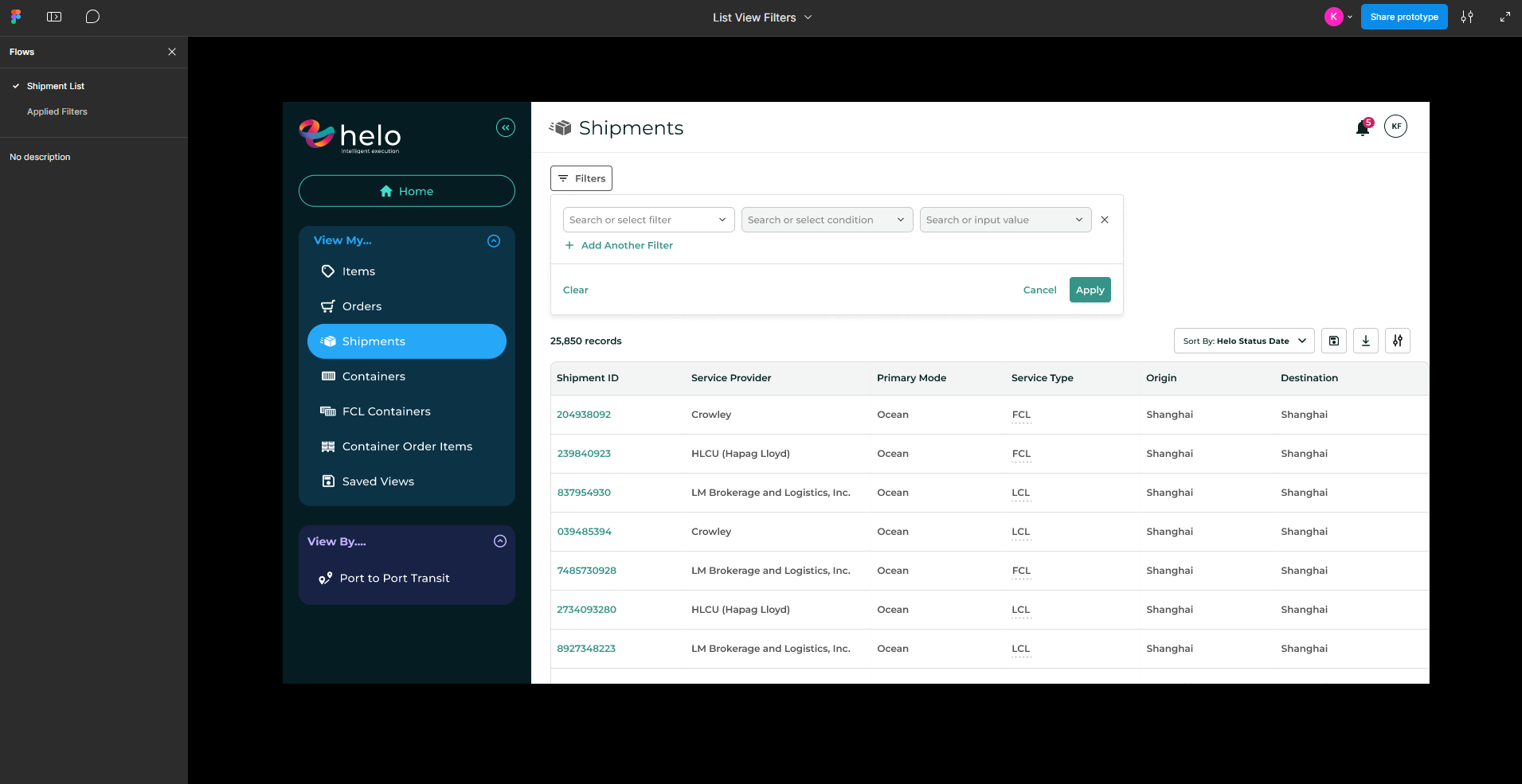
Design + Document
- Design initial prototype based on preliminary research
- Organize components and document important behaviors
PROCESS
Apply multiple filters at once
Users save time and retain context with bulk-add filters and type-ahead search capabilities.
PROCESS
Apply multiple filters at once
Users save time and retain context with bulk-add filters and type-ahead search capabilities.
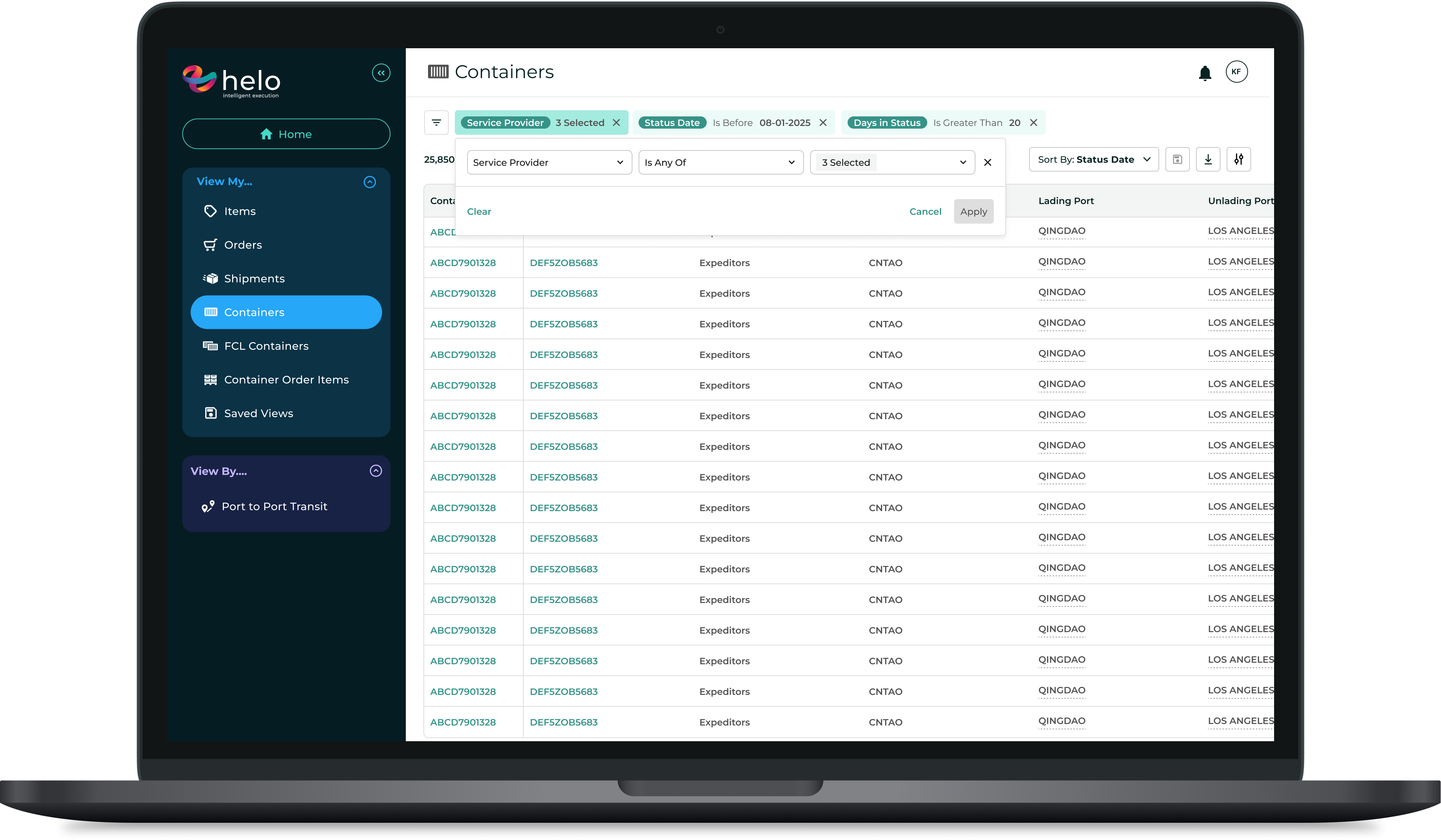
Fast filter editing
Once a filter is applied, users can interact directly with it without needing to reopen the module or clear the filter.
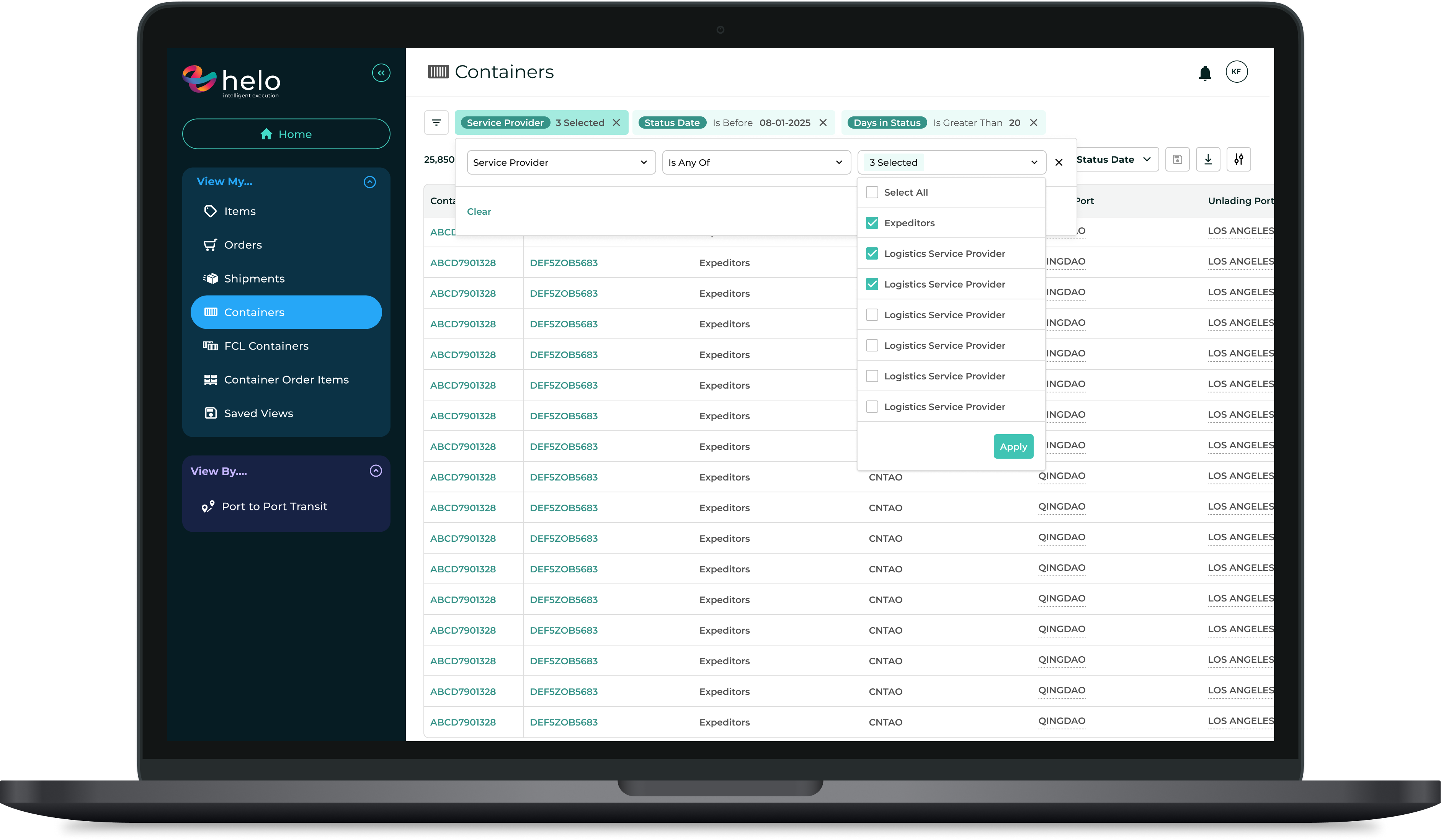
Pick-list dropdowns & type-ahead search
The new “Is any of” operator creates the option for multi-select lists. This has been especially helpful for users looking to filter for multiple carriers, IDs, and ports.
PROCESS
QA
Because we probably shouldn’t test in prod. Even though it’s fun sometimes (kidding! unless…).

HELO
List View Filters
Helo, a subsidiary of Expeditors, is a third-party supply chain visibility tool that ingests data from hundreds of carriers and logistics service providers to provide granular insight into a customer’s shipments, containers, orders, SKUs, and milestones.
Objective: Design an entirely new filtering system for all list-views that solves current user challenges, increases operational efficiency, and enhances the usability of the product.
Design Discipline: UX/UI Design, UX Research
My Role: Design Lead
Context
Helo’s previous filtering system was a side-bar filter experience, which users found to be a bit cumbersome when dealing with very large datatables. This filtering mechanism did not support pick-lists, forcing users to manually input all search criteria without the help of type-ahead search or multi-select options.

The Problem
Helo’s previous filtering system was a side-bar filter experience, which users found to be a bit cumbersome when dealing with very large datatables. This filtering mechanism did not support pick-lists, forcing users to manually input all search criteria without the help of type-ahead search or multi-select options.
Ultimately, users needed a way to filter their data more efficiently and in bulk.
PROCESS
Discovery
My design process always begins with the basics: requirements gathering and lots of research.
Regular whiteboarding sessions with PM
One-on-one meetings with top users
Industry research
PROCESS
Design + Document
- Design initial prototype based on preliminary research
- Organize components and document important behaviors
PROCESS
Validate + Refine
After a few rounds of feedback and iterations, it was time to demo the feature to the whole team and any additional stakeholders on the business side.
Primary goal: Confirm feature satisfies AC and gather any additional feedback prior to dev handoff.
PROCESS
Delivery
After any final refinements were made, the feature was ready for implementation.
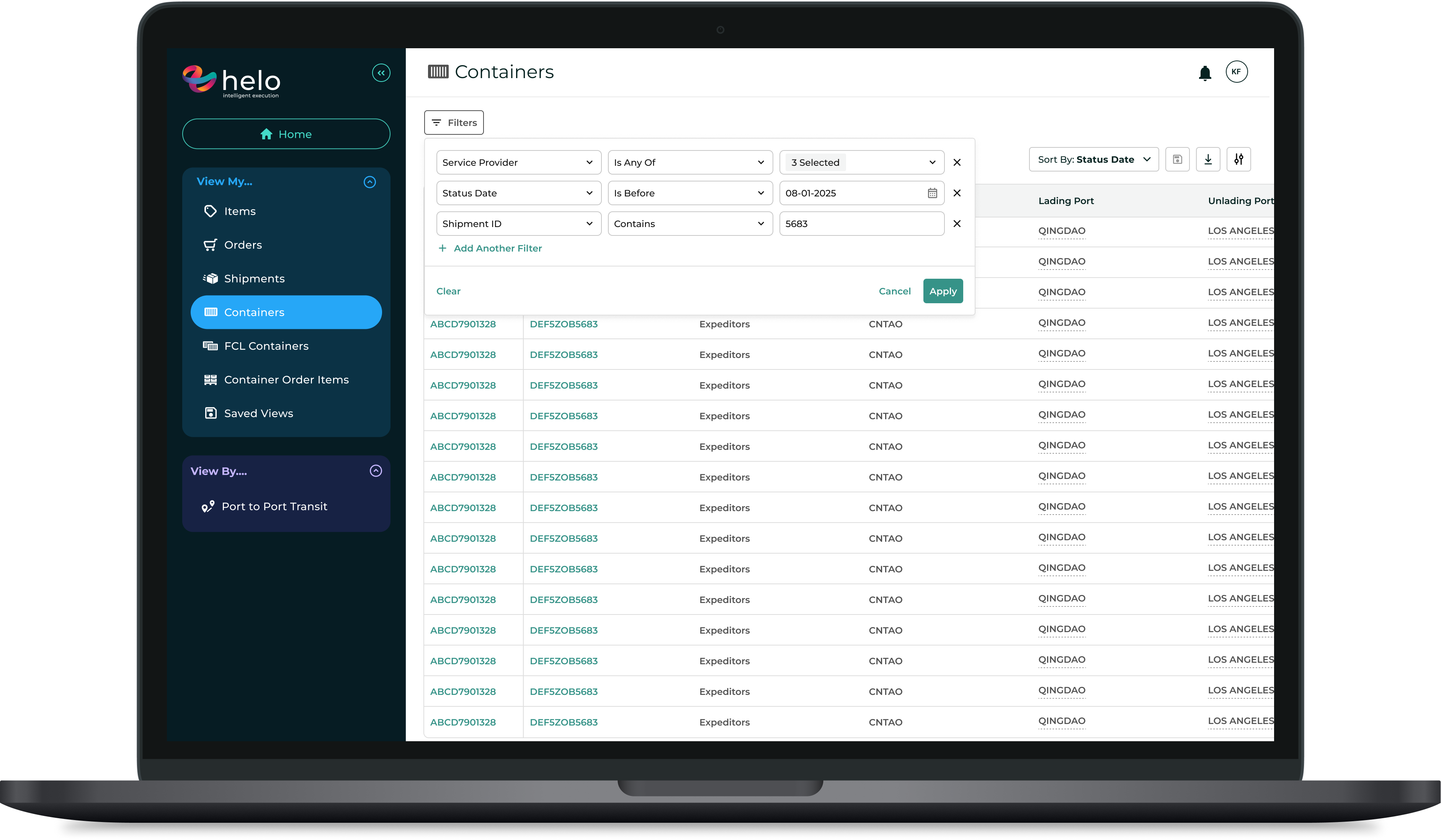
Designed for efficient search, the new filtering module removes the sidebar concept entirely, and offers a module where users can apply multiple filters at once and easily edit them once they’ve been applied.
Apply multiple filters at once
Users save time and retain context with bulk-add filters and type-ahead search capabilities.
Fast filter editing
Once a filter is applied, users can interact directly with it without needing to reopen the module or clear the filter.
Pick-list dropdowns & type-ahead search
The new “Is any of” operator creates the option for multi-select lists. This has been especially helpful for users looking to filter for multiple carriers, IDs, and ports.
HELO
List View Filters
Helo, a subsidiary of Expeditors, is a third-party supply chain visibility tool that ingests data from hundreds of carriers and logistics service providers to provide granular insight into a customer’s shipments, containers, orders, SKUs, and milestones.
Objective: Design an entirely new filtering system for all list-views that solves current user challenges, increases operational efficiency, and enhances the usability of the product.
Design Discipline: UX/UI Design, UX Research
My Role: Design Lead
Context
Helo’s previous filtering system was a side-bar filter experience, which users found to be a bit cumbersome when dealing with very large datatables. This filtering mechanism did not support pick-lists, forcing users to manually input all search criteria without the help of type-ahead search or multi-select options.
The Problem
Helo’s previous filtering system was a side-bar filter experience, which users found to be a bit cumbersome when dealing with very large datatables. This filtering mechanism did not support pick-lists, forcing users to manually input all search criteria without the help of type-ahead search or multi-select options.
Ultimately, users needed a way to filter their data more efficiently and in bulk.
PROCESS
Discovery
My design process always begins with the basics: requirements gathering and lots of research.
Regular whiteboarding sessions with PM
One-on-one meetings with top users
Industry research
PROCESS
Design + Document
- Design initial prototype based on preliminary research
- Organize components and document important behaviors
PROCESS
Validate + Refine
After a few rounds of feedback and iterations, it was time to demo the feature to the whole team and any additional stakeholders on the business side.
Primary goal: Confirm feature satisfies AC and gather any additional feedback prior to dev handoff.
PROCESS
Delivery
After any final refinements were made, the feature was ready for implementation.
Designed for efficient search, the new filtering module removes the sidebar concept entirely, and offers a module where users can apply multiple filters at once and easily edit them once they’ve been applied.
Apply multiple filters at once
Users save time and retain context with bulk-add filters and type-ahead search capabilities.
Fast filter editing
Once a filter is applied, users can interact directly with it without needing to reopen the module or clear the filter.
Pick-list dropdowns & type-ahead search
The new “Is any of” operator creates the option for multi-select lists. This has been especially helpful for users looking to filter for multiple carriers, IDs, and ports.
HELO
List View Filters
Helo, a subsidiary of Expeditors, is a third-party supply chain visibility tool that ingests data from hundreds of carriers and logistics service providers to provide granular insight into a customer’s shipments, containers, orders, SKUs, and milestones.
Objective: Design an entirely new filtering system for all list-views that solves current user challenges, increases operational efficiency, and enhances the usability of the product.
Design Discipline: UX/UI Design, UX Research
My Role: Design Lead
Context
Helo’s previous filtering system was a side-bar filter experience, which users found to be a bit cumbersome when dealing with very large datatables. This filtering mechanism did not support pick-lists, forcing users to manually input all search criteria without the help of type-ahead search or multi-select options.
The Problem
Helo’s previous filtering system was a side-bar filter experience, which users found to be a bit cumbersome when dealing with very large datatables. This filtering mechanism did not support pick-lists, forcing users to manually input all search criteria without the help of type-ahead search or multi-select options.
Ultimately, users needed a way to filter their data more efficiently and in bulk.
PROCESS
Discovery
My design process always begins with the basics: requirements gathering and lots of research.
Regular whiteboarding sessions with PM
One-on-one meetings with top users
Industry research
PROCESS
Design + Document
- Design initial prototype based on preliminary research
- Organize components and document important behaviors
PROCESS
Validate + Refine
After a few rounds of feedback and iterations, it was time to demo the feature to the whole team and any additional stakeholders on the business side.
Primary goal: Confirm feature satisfies AC and gather any additional feedback prior to dev handoff.
PROCESS
Delivery
After any final refinements were made, the feature was ready for implementation.
Designed for efficient search, the new filtering module removes the sidebar concept entirely, and offers a module where users can apply multiple filters at once and easily edit them once they’ve been applied.
Apply multiple filters at once
Users save time and retain context with bulk-add filters and type-ahead search capabilities.
Fast filter editing
Once a filter is applied, users can interact directly with it without needing to reopen the module or clear the filter.
Pick-list dropdowns & type-ahead search
The new “Is any of” operator creates the option for multi-select lists. This has been especially helpful for users looking to filter for multiple carriers, IDs, and ports.